One model, not three spreadsheets
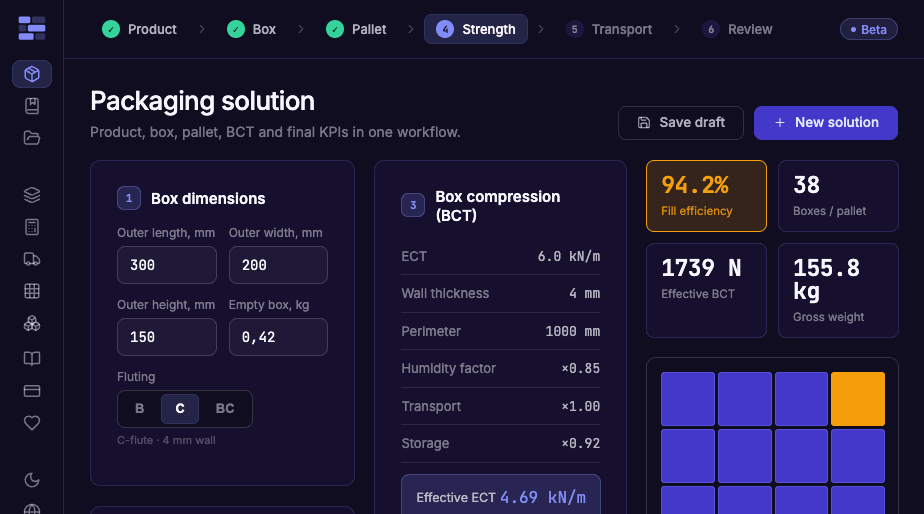
Change a box dimension and nesting, compression, pallet pattern and truck count move with it. Nothing is retyped between files.
packdev
Enter the box once — nesting, compression, pallet pattern and truck load are solved together, and every number updates when one changes. No copying data between spreadsheets.
8 per layer · 6 layers · max stack 1,800 mm
Simplified demo math — C-flute reference board, no overhang or interlocking. The full model adds flute grade, humidity, FEFCO style and load time; it does not replace testing.
Every item below is one field away from the others, because the whole chain is a single model.
Change a box dimension and nesting, compression, pallet pattern and truck count move with it. Nothing is retyped between files.
Required compression is compared against the board you actually buy, so a crushed bottom layer is caught on screen, not on arrival.
A full box-to-truck solution takes one pass of dimensions. Variants are a field edit away, not a new file.
Solutions are saved to a project with their inputs, so you can answer “what did we quote last time” without opening an archive.
The catalogue is built in: choose the style, and blank dimensions and material consumption follow from the same numbers.
Stack height and gross weight are flagged against warehouse and payload limits before the pallet is built.
Work step by step, or open every stage at once and change any input in any order. Nothing is recalculated by hand.
Try a calculationEnter product and box dimensions
Primary product, secondary box, gross weight. Nesting shows how many units fit and how much space is wasted.
Rate the box
Board grade, flute and FEFCO style give ECT and BCT with the safety factor applied to your real stack.
Build the pallet
Pattern, layers, overhang, stack height and gross weight — with the pallet type and height limit you work to.
Load the truck and save it
Pallets per vehicle, payload and fill rate. Save the solution to a project and compare variants later.
Nothing wrong with a good spreadsheet — packdev exists because the fourth recalculation of the same box is where mistakes get in.
Recognised engineering formulas
Box compression from the McKee relation and its accepted corrections — humidity, storage time, transport — each factor shown as a multiplier, not hidden in a constant.
FEFCO catalogue inside
Pick the construction by code — FEFCO 0201, 0427, 0713 — and blank size follows from it.
Every intermediate number on screen
Effective ECT, combined derating factor, load per box, safety factor, fill percentages. Nothing to reverse-engineer when a supplier disagrees.
packdev is in beta and honest about it: actual board strength can be lower than calculated, and no calculation replaces a compression test. Read the full method →
No account
free
Every calculator, every number, unlimited runs. Nothing is saved — close the tab and it is gone.
Start calculating →Free account
free · up to 3 projects
Saving needs an account — there has to be somewhere to save to. Keep solutions, reopen them with their inputs, compare variants.
Create an account →Paid
unlimited projects
For engineers who run packaging work daily: unlimited saved projects and full history. Pricing is being set during beta.
Stop paying and nothing is deleted or locked away. Every saved solution stays open for reading and export — the inputs, the numbers, the pallet, the spec sheet. What a subscription buys is the right to create and edit; what you already calculated is yours to keep.
A packaging spec signed off in 2026 still opens in 2036. No export deadline, no “download within 30 days” email.
No. Every calculator runs without registration. An account is only needed to save a solution — there has to be somewhere to save it to.
Calculating is free and unlimited. A free account saves up to three projects. Beyond that it becomes paid; pricing is being set during beta.
They stay. Saved solutions remain readable and exportable forever — a subscription buys creating and editing, not access to work you already did. Nothing is deleted and there is no export deadline.
The McKee relation and its accepted corrections for humidity, storage time and transport, with the safety factor and every multiplier visible in the result.
Treat it as engineering support, not a certificate. Actual board strength can be lower than calculated, and no calculation replaces a compression test.
Yes — the catalogue is built in. Pick a style by code and blank dimensions and material consumption follow from your box size.
The landing page, yes. The calculator itself is a desktop instrument — it is closer to CAD than to a mobile app, and the workflow needs the screen.
No account, no card, no setup. Enter one box and see the pallet and the truck on the same screen.
Try a calculationSend the inputs and what you expected instead. Arguments about board grades and safety factors are the most useful mail this project gets.